Welcome to the Umbraco Community!

The Umbraco Community is at the heart of the Umbraco ecosystem. It’s built on people coming together to share ideas, help each other, and make Umbraco better every day.

Come see how the Community stays connected, what makes it such a great place to be, and how you can join in and get involved. We always have room for more people to join!

MVP Summit audience.jpg 54610954933_1fd227623f_o (1).jpg Panel speaking in mics at umbraco event Person looking at laptop 52993341606_3b3a6a6991_o.jpg 2025 Group picture 1740139582170.jpg IMG_4217.jpg IMG20251030182101.jpg 2025 Community Teams day at Umbraco HQ DSC04687.jpg DSC05663.jpg MVP getting high five on stage MVPs speaking at MVP Summit 2 MVP waving at MVP Summit MVPs showing off awards IMG20251106141733.jpg 20251204_173423.jpg b6f67a24-17ea-4a21-bc55-65eca97d86ac.jpeg Codegarden 2023 Business Summit - people talking.jpg People high five'ing at Codegarden.jpg Boat ride 2025 Codegarden runners running

Get involved in the community

There's so many ways to get involved in the Umbraco community. 

A person looking into his laptop surrounded by people and light

New here? Welcome! We have a complete newcomer's guide to Umbraco and the Umbraco Community waiting for you.

A woman concentrating and looking down

No matter your interests, skills and time availability, there’s a way for you to participate in the Umbraco community. 

Two people high five'ing

Umbraco Meetups are a great way to engage with the Umbraco community and meet other like-minded people.

See what's happening

Join a meetup or an event near you - see all upcoming Umbraco events here

Blog posts from the Umbraco Community

Explore the latest blog posts from our community. Want to add your future blog posts to the list? Contact us here and let us know!

Advanced Permissions meets Umbraco 18!

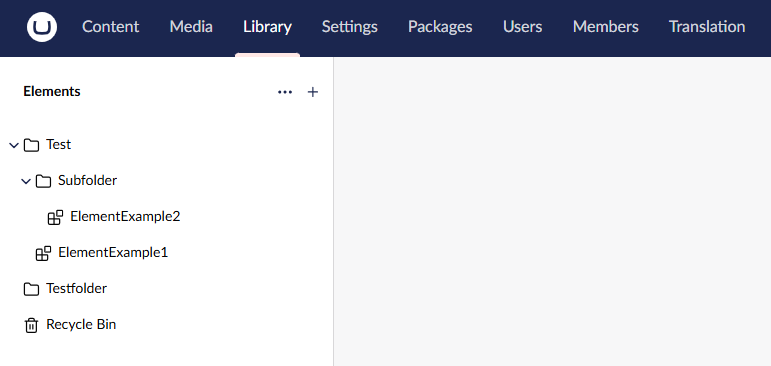
A few days ago, the final version of Umbraco 18 was released! So it was time to update my Advanced Permissions package to support Umbraco 18. This was not just a simple case of updating a few namespaces and dependencies and calling it done. The main new feature in Umbraco 18 was a perfect candidate for Advanced Permissions support, so that is exactly what I added! What is new in Umbraco 18 The Umbraco 18 release is (and I quote) "a short and sweet release". The main attraction is the new Library section and the first version of reusable Elements. Reusable Elements in the Library section are essentially Content nodes without rendering and routing. Other than that, they behave a lot like Content: you can create, delete, move them, and so on. That made them the perfect candidate for support in v18 of the Advanced Permissions package. Besides Library support, the package also has a few other improvements and additions. Let's talk about them! Library support! The first obvious new feature is the Permissions Editor for the Library. Just like with Content, you can set permissions for a User Group using the same inheritance and scoping system as the Content Permissions Editor. You'll notice that not every permission is applicable in every case, so N/A is displayed when a permission does not apply. And just like with Content, the Library also has an Access Viewer where you can see the effective permissions for a User Group or an individual User. I also added a Library Element Type Permissions Editor. Just like the Document Type Permissions Editor, you can set the insert options for Element Types for a specific User Group. With this Permissions Editor, you can control whether a User Group can create instances of an Element Type. This acts as a filter on the "create" list in the Library. And when a User has multiple User Groups, the well-established resolver will determine the effective permissions. Currently, because of a limitation in Umbraco, it is not yet possible to scope these permissions to a specific part of the Library tree like the Document Type Permissions Editor does. And of course, the Element Type Permissions Editor also has an associated Access Viewer. Redesign Because of all these new Permissions Editors and Access Viewers, the menu became harder to read at a glance. So the main menu has been redesigned around the scope of the editor and viewer. All editors and viewers in the menu are now called Permissions Editor and Access Viewer respectively. Their purpose is determined by the menu header they are under: Content, Document Type, Library, or Library Element Type. In the screenshot, you'll also notice a slight redesign of the workspaces for the editors and viewers. They now look more Umbraco native and display a one-line description of what the editor or viewer is for. And when you have not selected anything yet, it will now display a much nicer view. This will also be ported back to the Umbraco 17 version. To help or not to help In the top-right corner of each editor or viewer, you'll also notice a "learn more" button. This button gives access to more detailed documentation. It describes what the editor or viewer is for, and it links to more generic documentation explaining the concepts. Consider this a first version. It is already much better than nothing, but I think it can still be improved over time. This will also be ported back to the Umbraco 17 version. Localization support! And lastly, apart from the expanded documentation, Advanced Permissions now has localization for all languages that the Backoffice supports. Obviously, these translations are automatically generated because I am not fluent in 28 languages, so if you find an error, please let me know! All in all, I think this is a very nice and complete release. I'm happy that Advanced Permissions can support new Umbraco features as soon as they come out. You can find Advanced Permissions for Umbraco here: NuGet: https://www.nuget.org/packages/Umbraco.Community.AdvancedPermissions/ The Umbraco Marketplace: https://marketplace.umbraco.com/package/umbraco.community.advancedpermissions

by Luuk Peters

OC.Automate update

OC.Automate.LinkedIn is out of beta and OC.Automate.Bluesky and OC.Automate.Mastodon are all working on Umbraco 18

by Owain Williams

Umbraco Automate

by Owain Williams

Get in contact with us